
How to Check Whether a Website Link Redirects to Another Address
How to Check Whether a Website Link Redirects to Another Address
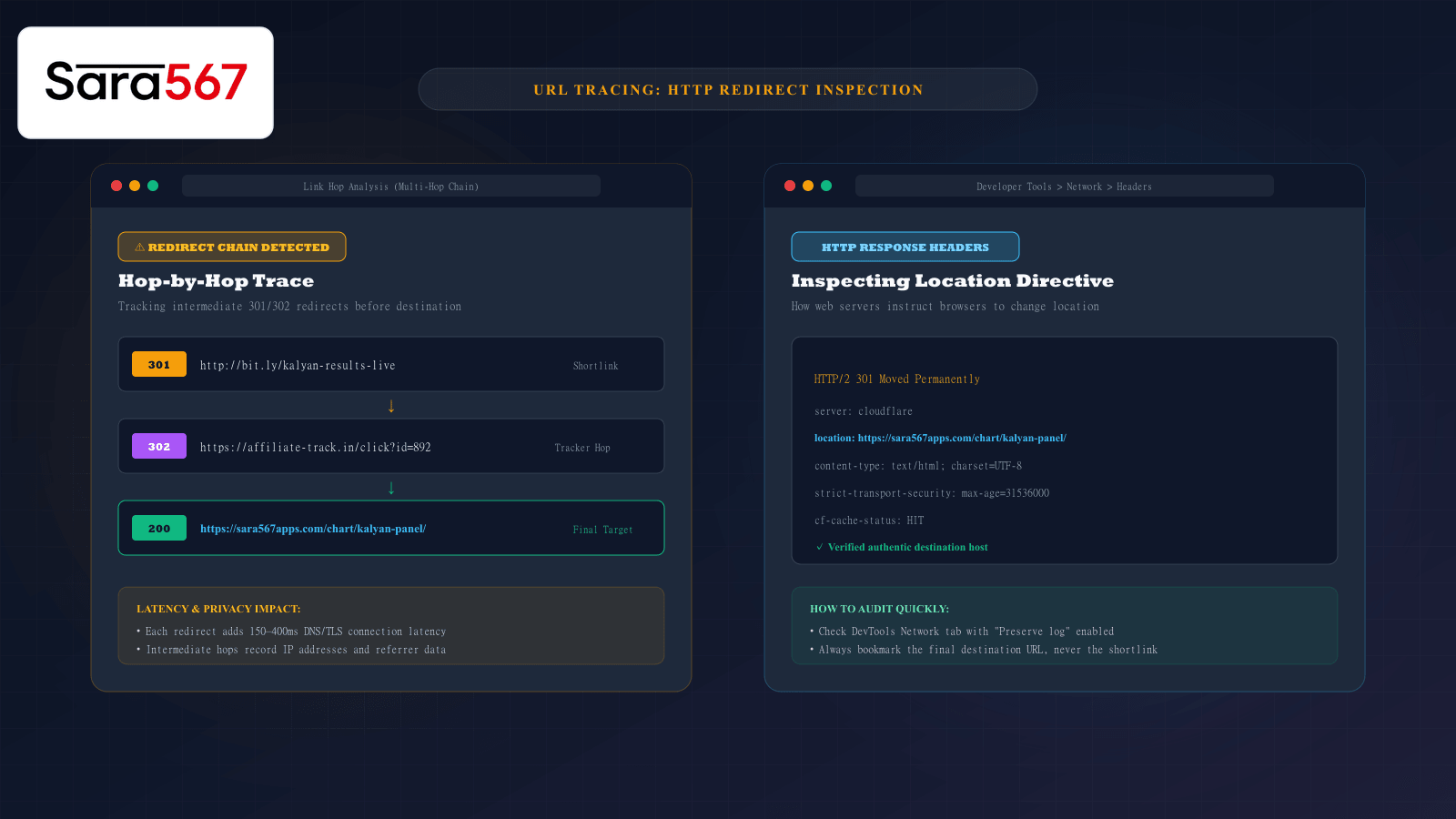
When browsing online forums, social media channels, or messaging groups dedicated to market updates—such as Kalyan Day, Madhur Night, or Milan Morning—hyperlinks are shared by the thousands. Often, these links are shortened with services like Bitly or TinyURL, or disguised under generic link text like "Click here for live numbers".
While you might expect clicking a link to open that specific web page directly, modern web traffic frequently routes through invisible intermediaries called HTTP redirects. A link might hop through two or three third-party tracking servers, ad exchange networks, or affiliate loggers before finally depositing you on an authentic informational platform like Sara 567.
Understanding how redirects work, why multi-hop redirect chains degrade your browsing experience, and how to inspect links before clicking them gives you complete control over your digital security and data privacy.
The Anatomy of an HTTP Redirect
A redirect is an automated technical instruction issued by a web server telling your browser: "The resource you requested is located at a different address. Go there instead."
In the HTTP protocol, redirects are declared using standardized 3xx status codes accompanied by a Location response header:
Browser ─── [GET http://short.link/kalyan] ───► Intermediary Server
Browser ◄── [HTTP/1.1 301 Moved Permanently] ── Intermediary Server
            [Location: https://sara567apps.com/chart/kalyan-panel/]

Browser ─── [GET https://sara567apps.com/chart/kalyan-panel/] ──► Destination Host
Browser ◄── [HTTP/2 200 OK + Full HTML Table] ────────────────── Destination Host
Because modern browsers follow these redirect instructions in fractions of a second, users rarely notice the transition unless they closely monitor their address bar or inspect the network stream.
The Different Types of Redirects Explained
Not all redirects are created equal. Web developers and network engineers utilize specific redirect status codes depending on the structural purpose:
┌────────────────────────────────────────────────────────────────────────┐
│                      HTTP REDIRECT CODE TAXONOMY                       │
├────────────┬─────────────────────────────┬─────────────────────────────┤
│ STATUS     │ TECHNICAL MEANING           │ PRIMARY USE CASE            │
├────────────┼─────────────────────────────┼─────────────────────────────┤
│ 301        │ Moved Permanently           │ Permanent site migration,   │
│            │                             │ HTTP to HTTPS enforcement   │
├────────────┼─────────────────────────────┼─────────────────────────────┤
│ 302 / 307  │ Found / Temporary Redirect  │ Geolocation routing,        │
│            │                             │ maintenance reroutes        │
├────────────┼─────────────────────────────┼─────────────────────────────┤
│ 308        │ Permanent Redirect          │ API routing preserving      │
│            │                             │ original request method     │
├────────────┼─────────────────────────────┼─────────────────────────────┤
│ JS / Meta  │ Client-Side Script Redirect │ Timed countdowns, ad hops,  │
│            │                             │ tracking pixel triggers     │
└────────────┴─────────────────────────────┴─────────────────────────────┘
A 301 Permanent Redirect informs search engines and browsers that an old URL has been retired forever. For example, when Sara 567 migrated legacy URLs to modern semantic structures, 301 redirects ensure old bookmarks seamlessly transfer search ranking equity and user traffic to the canonical URL without broken links.
In contrast, client-side JavaScript redirects (window.location.replace) occur inside your browser after the initial page has already rendered. These are frequently used by intermediate affiliate networks to drop tracking cookies before forwarding visitors to the real chart destination.
Three Hidden Risks of Unchecked Redirect Chains
While legitimate redirects are an essential component of web maintenance, complex redirect chains introduce three major drawbacks:
1. Increased Page Latency on Mobile Devices
Every individual redirect step requires an additional Domain Name System (DNS) query, a new TCP handshake, and a TLS encryption handshake. On 4G/5G mobile connections with variable signal strength, a three-hop redirect chain can add 800 to 1,500 milliseconds of dead delay before the table begins loading.
2. Privacy and Tracking Exposure
Intermediary redirect servers capture your client IP address, device user-agent string, and referrer headers. Third-party link shorteners and affiliate brokers monetize this metadata by building behavioural browsing profiles before redirecting you to your intended destination.
3. Open Redirect Phishing Hazards
In malicious scenarios, attackers exploit "open redirect" vulnerabilities on unpatched domains to deceive users. A link may visually appear to belong to a trusted website (e.g., https://trusted-site.com/out?url=...), but clicking it silently redirects visitors to an unverified clone platform designed to steal credentials.
How to Inspect and Trace Redirects Before Clicking
You do not need to guess where a shared link will take you. You can inspect the entire redirect pathway using native browser tools or lightweight utilities:
Method 1: Inspecting via Browser Developer Tools
If you are using desktop Chrome, Edge, Firefox, or Brave:
- Press
F12or right-click anywhere and select Inspect. - Click the Network tab.
- Check the box labeled "Preserve log" (this prevents the network activity from clearing when the page redirects).
- Paste the shared link into your browser address bar and hit Enter.
- In the Network waterfall, look at the top entries. Any row highlighted in yellow with a
301or302status represents an intermediate redirect hop. Clicking that row reveals the exactLocation:header pointing to the next server.
Method 2: Command-Line Curl Inspection
For power users and developers, the command line provides an instantaneous trace without executing any potentially unsafe client scripts:
curl -ILs "http://bit.ly/kalyan-results-live" | grep -E "HTTP/|location:"
The output immediately prints each step in the chain:
HTTP/1.1 301 Moved Permanently
location: https://affiliate-track.in/click?id=892
HTTP/2 302 Found
location: https://sara567apps.com/chart/kalyan-panel/
HTTP/2 200 OK
Method 3: Unpacking Shortlinks with Web Expanders
If you are browsing on a mobile phone without developer tools:
- For Bitly links: Add a plus sign
+to the very end of any Bitly URL (e.g.,bit.ly/example+) and open it in your browser. Bitly will display an official preview page revealing the destination URL and click statistics without executing the redirect. - For other shorteners: Use free web expander services (such as CheckShortURL or WhereGoes) to unpack the final destination before visiting.
Best Practices: Always Bookmark the Final Canonical Address
Whenever you land on an informational chart page that you intend to revisit regularly:
- Allow all redirects to conclude and let the final page load completely.
- Check the browser address bar to verify that the domain reads sara567apps.com.
- Confirm that the URL follows a direct canonical path (such as
/chart/kalyan-panel/or/chart/milan-day/). - Save that specific final URL to your bookmarks, completely bypassing the shortlink or intermediary tracker on future visits.
Summary
Redirects are a foundational mechanism of web infrastructure, but navigating shared links blindly exposes you to unnecessary connection lag and privacy tracking. By understanding how HTTP status codes guide your browser, unmasking shortlinks before clicking, and always bookmarking the authoritative canonical destination, you ensure your access to live market charts remains fast, transparent, and secure.
Explore Corresponding Market Charts & Verification Tools
Verify real-time numbers, track open/close records, and analyze weekly trends on our informational dashboard.