
How to Make Wide Data Tables Usable on Mobile Screens
How to Make Wide Data Tables Usable on Mobile Screens
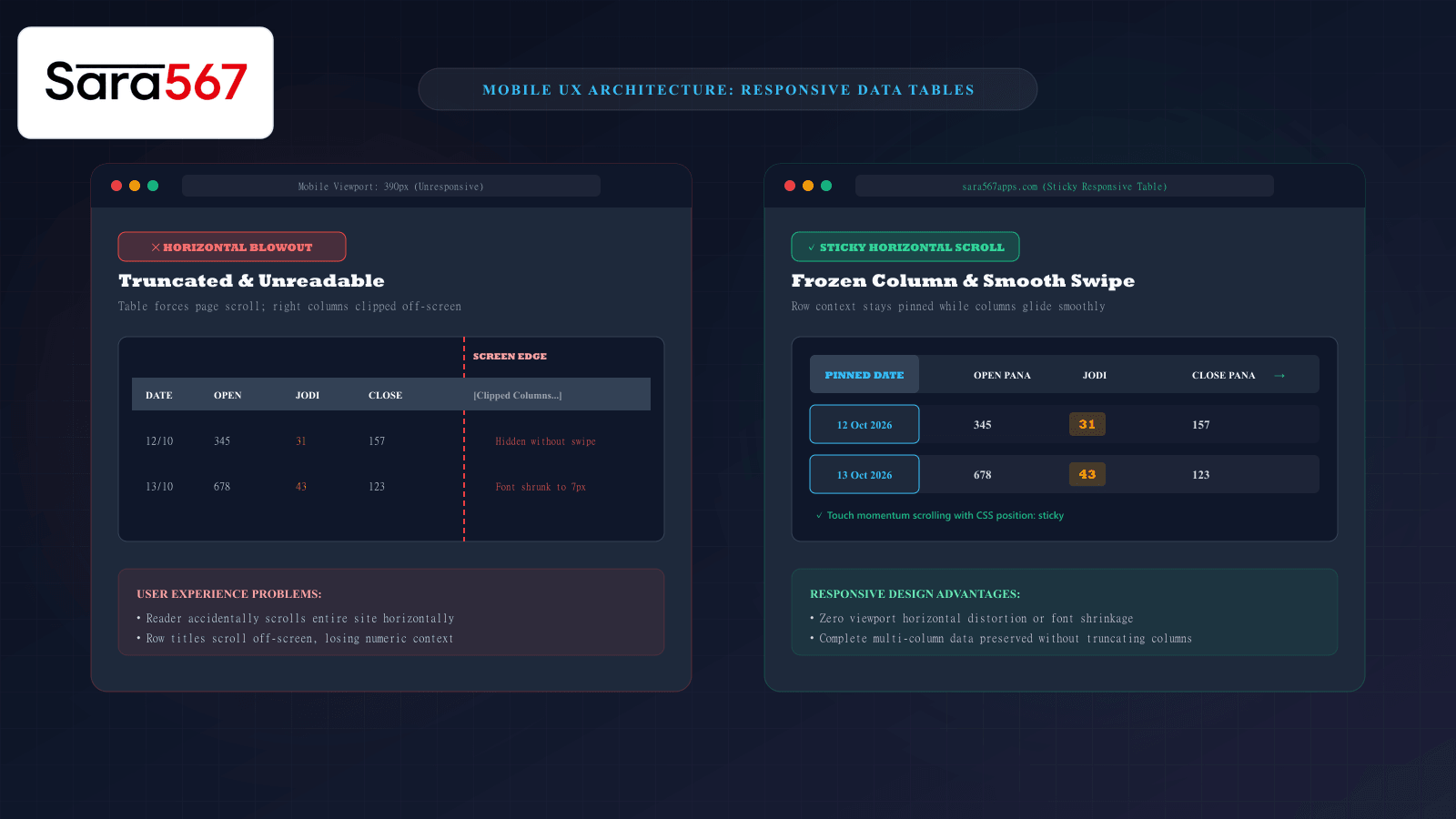
Over 75% of web visitors browse informational portals and data dashboards exclusively on smartphones. However, dense tabular data—such as weekly market archives for Kalyan, Milan Day, Madhur Morning, or Time Bazar—often features six, eight, or even twelve columns spanning dates, opening session Panas, Jodi brackets, closing session Panas, and status flags.
When a multi-column table designed for a 1920-pixel desktop monitor is loaded onto a 390-pixel smartphone screen without proper responsive engineering, the browsing experience collapses: text shrinks into unreadable micro-font, cells wrap unpredictably into vertical towers, or the entire website blows out horizontally, forcing users to awkwardly pinch and scroll across a broken canvas.
Modern front-end engineering provides proven architectural patterns to preserve dense data relationships on small screens. Understanding how platforms like Sara 567 implement these responsive table strategies ensures data remains legible, accessible, and effortless to navigate.
The Core Dilemma: Fixed Desktop Grid vs. Narrow Mobile Viewport
By default, the HTML table rendering engine calculates cell widths based on the longest unbreakable content string inside each column. If eight columns each require a minimum of 80 pixels, the table requires at least 640 pixels of horizontal width.
On a smartphone with a 360px viewport:
┌────────────────────────────────────────────────────────┐
│ MOBILE VIEWPORT (360px)                                │
├───────────────┬───────────────┬────────────────────────┤
│ Date (80px)   │ Open (80px)   │ Jodi (80px)   │ [ 320px OFF-SCREEN... ]
└───────────────┴───────────────┴────────────────────────┘
Without CSS interventions, this causes horizontal layout blowout: the <body> element expands beyond the screen boundary, introducing unwanted horizontal scrolling to the entire webpage, disrupting the navigation menu, search bars, and text readability.
Three Proven Responsive Table Architecture Patterns
Web developers rely on three primary techniques to resolve the mobile table dilemma, each tailored to specific data structures:
┌────────────────────────────────────────────────────────────────────────┐
│                   RESPONSIVE TABLE PATTERN MATRIX                      │
├────────────────────┬───────────────────────────────────────────────────┤
│ 1. STICKY OVERFLOW │ Pinned row header (e.g. Date); horizontal swipe   │
│    CONTAINER       │ for remaining columns. Best for multi-week charts.│
├────────────────────┼───────────────────────────────────────────────────┤
│ 2. RE-FLOW CARD    │ Rows transform into individual vertical cards     │
│    TRANSFORMATION  │ using CSS Grid & data-label pseudo-elements.      │
├────────────────────┼───────────────────────────────────────────────────┤
│ 3. COLLAPSIBLE     │ Secondary columns hide behind expandable accord-  │
│    CHILD ROWS      │ ion arrows (+), keeping primary numbers visible.  │
└────────────────────┴───────────────────────────────────────────────────┘
1. The Pinned-Header Overflow Container (The Gold Standard)
For comprehensive market archives that span multiple years, users must be able to scan down rows while cross-referencing values horizontally. The most effective pattern wraps the table inside an isolated, hardware-accelerated horizontal scroll container with sticky positioning:
<div class="table-scroll-container">
  <table class="market-chart-table">
    <thead>
      <tr>
        <th class="sticky-column">Date</th>
        <th>Open Pana</th>
        <th>Jodi</th>
        <th>Close Pana</th>
      </tr>
    </thead>
    <tbody>
      <tr>
        <td class="sticky-column">12 Oct 2026</td>
        <td>345</td>
        <td>31</td>
        <td>157</td>
      </tr>
    </tbody>
  </table>
</div>
.table-scroll-container {
  width: 100%;
  overflow-x: auto;
  -webkit-overflow-scrolling: touch; /* Smooth momentum scrolling on iOS */
  position: relative;
}

.market-chart-table {
  width: 100%;
  min-width: 600px; /* Enforces legibility without squishing text */
  border-collapse: separate;
  border-spacing: 0;
}

/* Freeze the first column (Date or Market Name) */
.sticky-column {
  position: sticky;
  left: 0;
  background-color: #0f172a; /* Solid background prevents see-through overlap */
  z-index: 2;
  box-shadow: 2px 0 5px rgba(0, 0, 0, 0.2); /* Depth cue */
}
Why this pattern excels:
- Zero Page Blowout: The parent page remains perfectly locked at 100% viewport width. Only the inner table container scrolls.
- Context Preservation: As the reader swipes horizontally to inspect the evening draw or weekly aggregate, the Date column remains pinned to the left edge of the screen, ensuring the viewer never loses track of which row they are reading.
- Natural Touch Physics: Mobile users immediately understand swipe gestures, navigating dense records with native smartphone fluidity.
2. CSS Grid Re-Flow Card Transformation
For daily scoreboard dashboards displaying only today’s active markets, transforming table rows into vertical mobile cards provides maximum legibility:
@media (max-width: 640px) {
  /* Force table elements to behave like standard block divs */
  .market-summary-table,
  .market-summary-table tbody,
  .market-summary-table tr,
  .market-summary-table td {
    display: block;
    width: 100%;
  }

  /* Hide the desktop header row completely */
  .market-summary-table thead {
    display: none;
  }

  .market-summary-table tr {
    margin-bottom: 1rem;
    border: 1px solid #334155;
    border-radius: 0.75rem;
    padding: 0.75rem;
    background-color: #1e293b;
  }

  /* Inject column labels via CSS attributes */
  .market-summary-table td {
    display: flex;
    justify-content: space-between;
    padding: 0.5rem 0;
    border-bottom: 1px solid rgba(255, 255, 255, 0.05);
  }

  .market-summary-table td::before {
    content: attr(data-label);
    font-weight: 700;
    color: #94a3b8;
  }
}
With this responsive technique, a row that rendered as four cramped horizontal columns on desktop automatically reshapes on mobile into a clean vertical card, with labels ("Open Pana", "Jodi", "Close Pana") explicitly printed on the left and values aligned on the right.
Visual affordance: Signaling Off-Screen Content
A frequent UX failure on mobile websites is cut-off ambiguity: if a table scrolls horizontally, but the right-hand column happens to align perfectly with the smartphone bezel, a visitor may not realize more data exists off-screen.
To eliminate this confusion, high-performance interfaces implement two visual cues:
- Subtle CSS Scroll Shadows: A faint gradient shadow applied to the right edge of the table container visually signals that content continues beyond the screen edge.
- Explicit Touch Swipe Cues: Placing a small helper indicator (
← Swipe horizontally to view full chart →) directly above the table informs first-time visitors that the table is interactive.
Summary
Dense data tables do not have to be an obstacle on mobile devices. By moving away from rigid desktop table rendering and adopting isolated overflow containers, sticky frozen key columns, and adaptive card transformations, platforms like Sara 567 deliver a responsive browsing experience that keeps complex market archives crystal-clear on any screen size.
Explore Corresponding Market Charts & Verification Tools
Verify real-time numbers, track open/close records, and analyze weekly trends on our informational dashboard.