
How to Report a Website Error Without Sharing Private Information
How to Report a Website Error Without Sharing Private Information
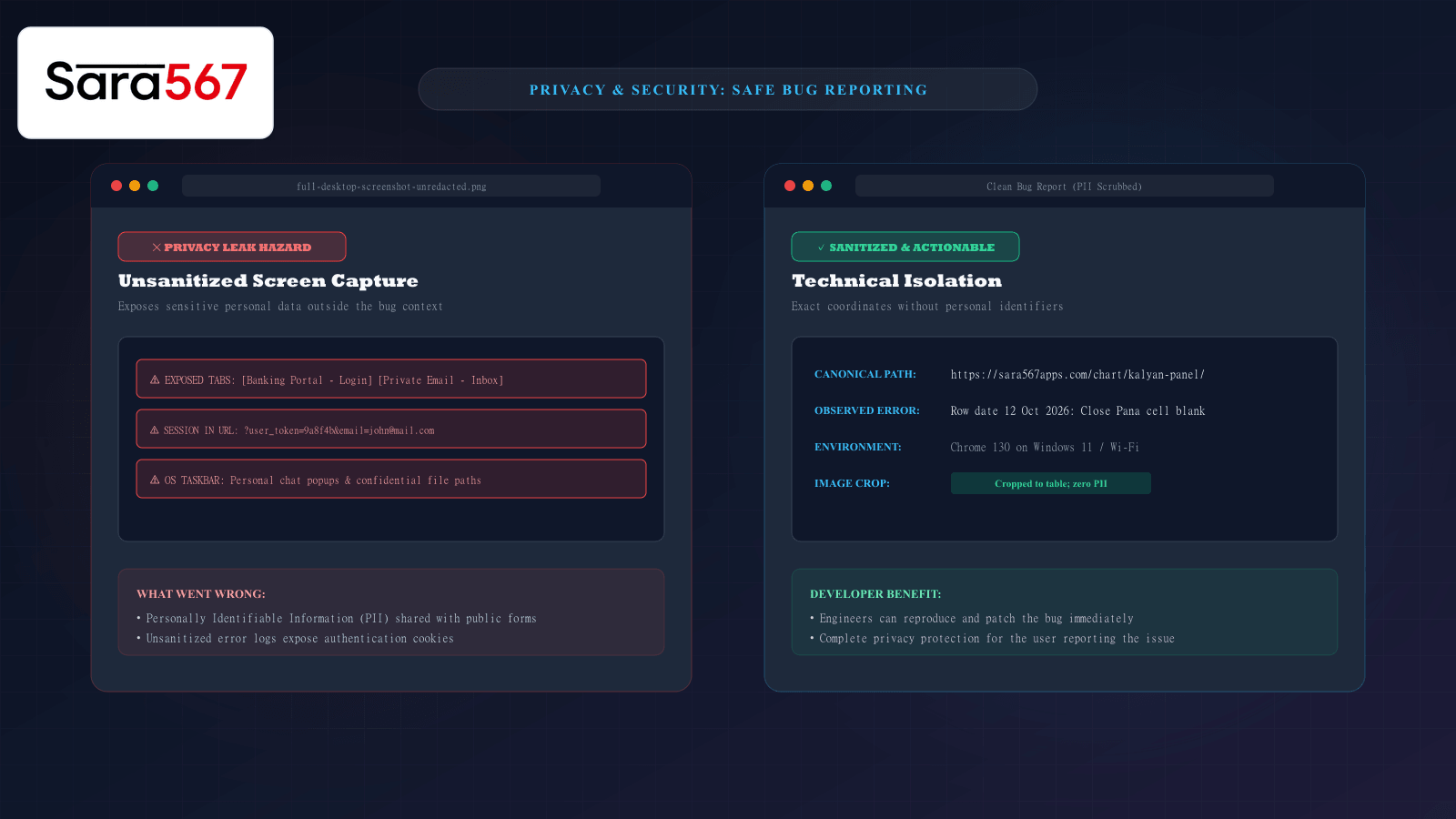
When reviewing historical market records, panel matrices, or live scoreboards on platforms like Sara 567, you may occasionally spot a technical glitch. Perhaps a table column is misaligned on your specific mobile screen, a historical row shows an empty cell where a closing number was declared, or a search filter produces an unexpected 404 error.
Submitting feedback to the platform’s engineering team is the most effective way to get issues investigated and resolved. However, many well-intentioned users inadvertently compromise their digital privacy in the process.
Capturing an uncropped full-desktop screenshot or copying an entire browser address bar containing session tokens can inadvertently expose personal banking tabs, confidential email addresses, chat notifications, or private browsing history.
Learning how to construct an actionable, privacy-conscious bug report ensures developers can replicate and fix the issue swiftly without exposing your personal information.
The Hidden Privacy Hazards in Everyday Bug Reports
Most people report technical bugs using the quickest method available: pressing the "Print Screen" key on their keyboard or taking a whole-screen phone capture and emailing it to support.
┌────────────────────────────────────────────────────────────────────────┐
│                   COMMON PRIVACY EXPOSURES IN RAW REPORTS              │
├────────────────────┬───────────────────────────────────────────────────┤
│ UN-CROPPED         │ Other open browser tabs showing banking portals,  │
│ SCREENSHOTS        │ webmail inboxes, medical portals, or social apps. │
├────────────────────┼───────────────────────────────────────────────────┤
│ OPERATING SYSTEM   │ Taskbars and status trays displaying active Skype/│
│ METADATA           │ WhatsApp message previews, internal file paths,   │
│                    │ and full account names.                           │
├────────────────────┼───────────────────────────────────────────────────┤
│ DIRTY ADDRESS      │ URL query strings containing private session keys,│
│ BAR COPIES         │ referral IDs, or personal email identifiers       │
│                    │ (e.g., ?session_id=...&user_email=...).           │
└────────────────────┴───────────────────────────────────────────────────┘
Support ticket systems and bug trackers are frequently accessed by automated triage bots, customer service agents, and external software contractors. Sending unredacted personal details risks leaking your data into permanent third-party logs.
Step-by-Step: The Privacy-First Reporting Protocol
A good error report contains 100% of the technical context engineers need and 0% of your personal life. Follow these four steps to prepare a safe report:
Step 1: Crop Tightly to the Error Context
Never capture your entire display. Instead, use built-in regional snipping tools:
- On Windows: Press Windows Key + Shift + S to draw a tight box around only the affected table or error message.
- On Mac: Press Command + Shift + 4 to drag a selection box around the error.
- On Android & iOS: Immediately after capturing the screen, tap the crop icon and drag the bounding corners inward until all browser tabs, bookmarks, and status bars are excluded.
If a sensitive element (such as an account number or name) falls within the necessary crop, use a basic drawing tool to apply an opaque black rectangle directly over the text. Avoid transparent blur or pixelation filters, as algorithmic de-blurring tools can sometimes reconstruct blurred text.
Step 2: Strip Dynamic Tokens from the URL
Before sharing a webpage link where an error occurred, inspect the address string:
UNSAFE DIRTY URL:
https://sara567apps.com/chart/kalyan-panel/?ref=telegram&auth=9a8d7c6b5e&user=john

SANITIZED CLEAN CANONICAL URL:
https://sara567apps.com/chart/kalyan-panel/
Remove everything after the question mark (?). The clean canonical path tells the development team exactly which template and route is failing without sharing your browsing referral history or authentication credentials.
Step 3: Document the Minimum Environment Specifications
Developers cannot fix an issue if they cannot reproduce it. Rather than sharing your computer identity, provide the three generic technical parameters that matter:
- Device Type & Operating System: (e.g., "Windows 11 desktop" or "Android 15 mobile").
- Browser Name & Major Version: (e.g., "Google Chrome 130" or "Safari iOS 18").
- Connection Interface: (e.g., "Home broadband Wi-Fi" or "Cellular 5G mobile data").
None of these three data points identify you personally, but they provide the exact testing matrix needed to isolate browser-specific CSS or JavaScript rendering bugs.
Step 4: Provide Numbered Reproduction Steps
Instead of writing "Your Kalyan chart is broken", provide a precise three-step sequence:
- Navigate to
https://sara567apps.com/chart/kalyan-panel/. - Scroll down to the row dated Monday, 12 Oct 2026.
- Observe that the Close Pana cell shows an empty dash while the Jodi reads 31.
Sanitized Bug Report Template
When submitting an error report to site administrators or support forums, copy and fill out this clean, privacy-hardened template:
### Summary of Observed Glitch:
[Brief 1-sentence description of the issue]

### Page URL:
https://sara567apps.com/chart/[market-slug]/

### Reproduction Steps:
1. Open the URL listed above.
2. Filter or scroll to [Date or Section].
3. Observe [Error behavior vs expected behavior].

### Technical Environment:
- Device: [Android Mobile / iPhone / Windows PC]
- Browser: [Chrome / Safari / Edge / Firefox]
- Network: [Wi-Fi / Cellular Mobile Data]

### Attached Image:
[Cropped regional screenshot showing ONLY the table error with all PII redacted]
Summary
Providing high-quality bug reports is an invaluable contribution to the accuracy and reliability of informational data platforms like Sara 567. By cropping screenshots tightly, stripping session tokens from shared URLs, and communicating through structured technical steps, you can help engineering teams resolve glitches rapidly while keeping your personal browsing data completely secure.
Explore Corresponding Market Charts & Verification Tools
Verify real-time numbers, track open/close records, and analyze weekly trends on our informational dashboard.