
Screen Readers and HTML Tables: Why Header Labels Matter
Screen Readers and HTML Tables: Why Header Labels Matter
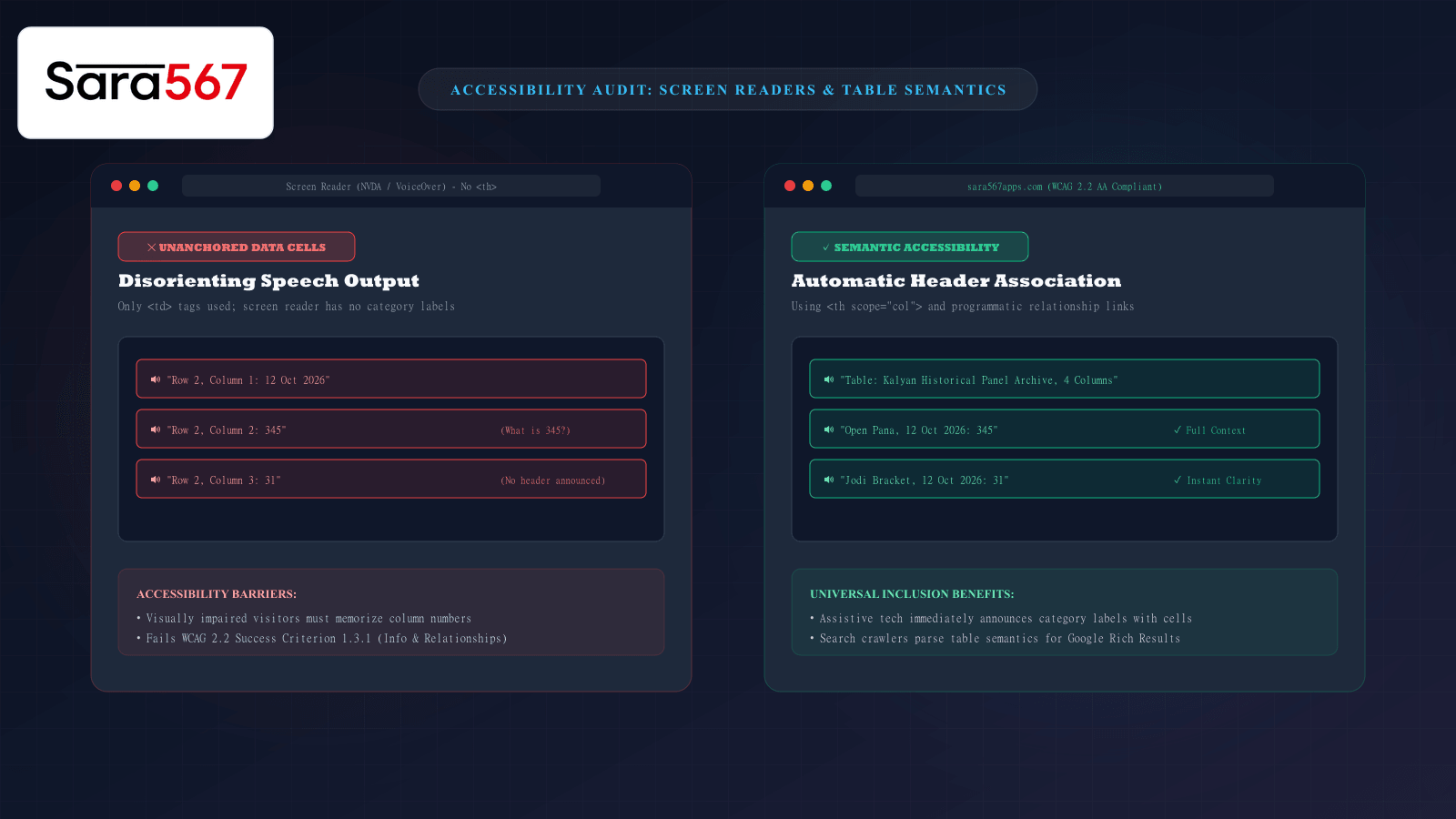
When sighted users look at a market chart on Sara 567, their eyes naturally scan two dimensions simultaneously. They see a date on the left, glance upward to verify the column heading ("Open Pana", "Jodi Bracket", or "Close Pana"), and instantly perceive the number 345 in its full mathematical context.
However, millions of internet users navigate the web using assistive technologies—such as screen readers (NVDA, JAWS, Apple VoiceOver, and Android TalkBack) or refreshable braille displays. For a person who is blind or visually impaired, the web is not a two-dimensional visual grid; it is an auditory and tactile sequential stream.
When a data table lacks semantic HTML markup, a screen reader is forced to read isolated numbers in a disorienting vacuum. Learning how screen readers interpret tabular markup—and why the W3C Web Content Accessibility Guidelines (WCAG) require programmatic header association—explains why structural markup is essential for true digital accessibility and modern SEO.
How a Screen Reader Traverses a Data Table
Screen readers feature specialized keyboard navigation modes designed specifically for tabular data. By using shortcuts (such as Ctrl + Alt + Arrow Keys in NVDA or VO + Arrow Keys in VoiceOver), a user can move horizontally across columns or vertically down rows.
As the user lands on an individual cell, the screen reader queries the browser’s Accessibility Tree (an internal operating system API layer that mirrors the Document Object Model).
The software attempts to answer two fundamental questions before speaking:
- What value is in this cell?
- What label or header governs this cell?
┌────────────────────────────────────────────────────────────────────────┐
│                   SCREEN READER SPEECH COMPARISON                      │
├────────────────────┬───────────────────────────────────────────────────┤
│ INACCESSIBLE TABLE │ 🔊 "Row 2, Column 3: 31"                          │
│ (Using <td> tags)  │ User has no idea what "31" represents.            │
│                    │ Is it a temperature, a date, a Pana, or a Jodi?   │
├────────────────────┼───────────────────────────────────────────────────┤
│ SEMANTIC TABLE     │ 🔊 "Kalyan Archive, Jodi Bracket,                 │
│ (Using <th scope>) │     12 Oct 2026: 31"                              │
│                    │ Full context announced instantly and effortlessly.│
└────────────────────┴───────────────────────────────────────────────────┘
When proper semantic headers are absent, the user must manually backtrack to the top row, count columns in their head, and guess what each cell represents—a frustrating and mentally exhausting process.
The Difference Between Visual Styling and Semantic Markup
A common pitfall among novice web designers is relying on CSS styling to create "visual headers" rather than using real HTML semantic elements:
<!-- INACCESSIBLE: Looks bold to sighted users, invisible to screen readers -->
<tr>
  <td class="bold-blue-heading">Date</td>
  <td class="bold-blue-heading">Open Pana</td>
  <td class="bold-blue-heading">Jodi</td>
  <td class="bold-blue-heading">Close Pana</td>
</tr>
To a sighted reader, adding font-weight: 800 and a dark background makes those cells look like headers. But to the browser's Accessibility Tree, those elements are ordinary data cells (ROLE_CELL). The screen reader treats them as ordinary values rather than governing labels.
The Accessible Semantic Solution: <th scope="col">
Under WCAG 2.2 Success Criterion 1.3.1 (Info and Relationships), tabular headers must be marked programmatically:
<!-- ACCESSIBLE: W3C / WCAG Compliant -->
<thead>
  <tr>
    <th scope="col">Date</th>
    <th scope="col">Open Pana</th>
    <th scope="col">Jodi</th>
    <th scope="col">Close Pana</th>
  </tr>
</thead>
The <th> tag defines the cell as a header, while the scope="col" attribute explicitly instructs assistive software that this label applies to every data cell directly below it in that vertical column.
Similarly, for the leftmost date column, applying <th scope="row"> ensures that as the user navigates horizontally across a row, the screen reader repeats the associated date before speaking each draw.
Complex Multi-Level Headers: Handling colspan and rowspan
In multi-session market charts—such as weekly tables detailing both Morning and Evening draws for markets like Milan or Rajdhani—tables frequently feature grouped headers:
┌────────────────────────────────────────────────────────────────────────┐
│                   MILAN MARKET WEEKLY HISTORICAL MATRIX                │
├──────────────┬──────────────────────────┬──────────────────────────────┤
│              │ DAY SESSION              │ NIGHT SESSION                │
│ DATE         ├────────────┬─────────────┼──────────────┬───────────────┤
│              │ Open Pana  │ Jodi        │ Open Pana    │ Jodi          │
├──────────────┼────────────┼─────────────┼──────────────┼───────────────┤
│ 12 Oct 2026  │ 345        │ 31          │ 678          │ 43            │
└──────────────┴────────────┴─────────────┴──────────────┴───────────────┘
Without advanced header associations, a screen reader landing on 345 will announce "Open Pana, 345", leaving the user unaware of whether that Pana belongs to the Day Session or the Night Session.
To solve this, accessible architecture utilizes <th scope="colgroup">:
<thead>
  <tr>
    <th rowspan="2" scope="col">Date</th>
    <th colspan="2" scope="colgroup">Day Session</th>
    <th colspan="2" scope="colgroup">Night Session</th>
  </tr>
  <tr>
    <th scope="col">Open Pana</th>
    <th scope="col">Jodi</th>
    <th scope="col">Open Pana</th>
    <th scope="col">Jodi</th>
  </tr>
</thead>
With scope="colgroup", the screen reader announces the complete multi-tiered parentage: "Day Session, Open Pana, 12 Oct 2026: 345".
The Hidden SEO Benefit of Accessible Tables
Building accessible tables is not only a matter of digital inclusion; it directly boosts search engine performance.
Google's indexing spider (Googlebot) operates essentially as a headless, non-visual user agent. It cannot "see" colorful CSS gradients or bold text styling. Google relies on identical semantic tags (<caption>, <thead>, <th>, <th scope="col">) to parse table entities and display rich snippet carousels, answer boxes, and tabular comparison results directly in Google Search results.
A table that is completely legible to a screen reader is equally understandable to Google’s semantic search indexing algorithms.
Summary
Data tables exist to communicate complex numerical relationships clearly. By adopting semantic <th> elements, defining scope attributes, and structuring table tiers with <thead> and <tbody>, web platforms like Sara 567 ensure that market archives are universally accessible to all visitors—whether they are reading on high-resolution desktop monitors, navigating on smartphones, or listening through screen readers.
Explore Corresponding Market Charts & Verification Tools
Verify real-time numbers, track open/close records, and analyze weekly trends on our informational dashboard.