
What Is a Canonical URL? Why Similar Pages Can Have Different Addresses
What Is a Canonical URL? Why Similar Pages Can Have Different Addresses
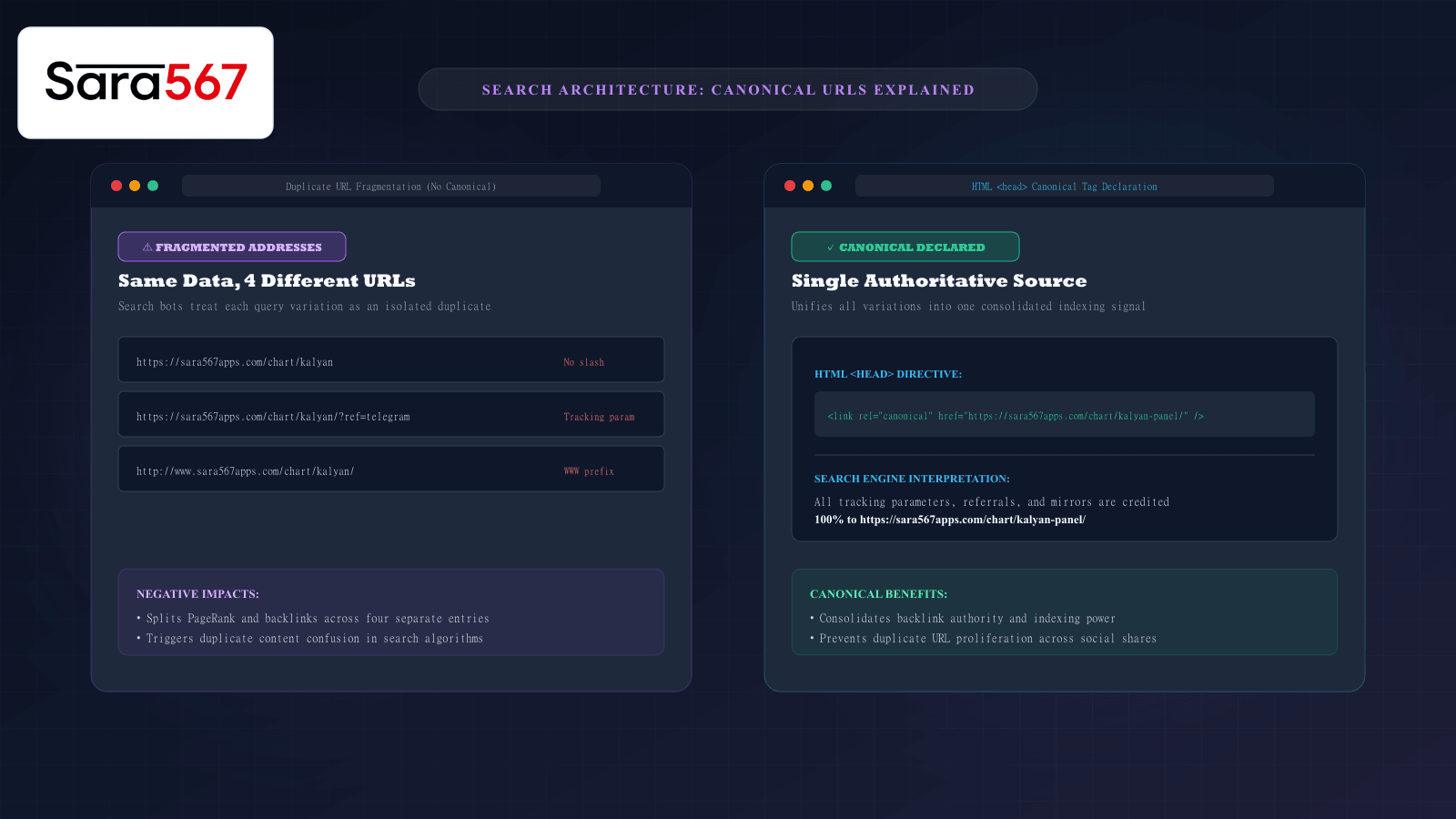
When browsing online informational platforms like Sara 567, you may notice that the exact same historical chart—such as the Kalyan Panel Chart or Madhur Morning record—can frequently be loaded through multiple subtly different web addresses.
For example, you might reach the chart through:
https://sara567apps.com/chart/kalyan-panel/(Standard trailing slash)https://sara567apps.com/chart/kalyan-panel(No trailing slash)https://sara567apps.com/chart/kalyan-panel/?ref=telegram(Campaign tracking parameter)https://sara567apps.com/chart/kalyan-panel/?session=live(Filter query)
To a human reader, all four addresses display the exact same table of numbers. But to search engines like Google, Bing, and DuckDuckGo, each of these URLs is technically a completely distinct webpage.
Without a clear structural rule declaring which version is the master record, search engines struggle with duplicate content confusion, dividing search authority across multiple duplicates.
This is where the canonical URL (rel="canonical") comes in. Understanding how canonical tags work ensures that web platforms maintain crystal-clear search rankings and that users always reference the true authoritative destination.
The Technical Problem: The Duplicate URL Proliferation Trap
Web servers and web browsers communicate through strict string matching. Even an apparently trivial difference in an address string creates a unique HTTP request:
┌────────────────────────────────────────────────────────────────────────┐
│                   HOW DUPLICATE URLS ARE CREATED                       │
├────────────────────┬───────────────────────────────────────────────────┤
│ TRAILING SLASHES   │ /chart/kalyan/  vs  /chart/kalyan                 │
├────────────────────┼───────────────────────────────────────────────────┤
│ SUBDOMAINS         │ www.sara567apps.com  vs  sara567apps.com          │
├────────────────────┼───────────────────────────────────────────────────┤
│ PROTOCOLS          │ http:// (unencrypted)  vs  https:// (secure)      │
├────────────────────┼───────────────────────────────────────────────────┤
│ TRACKING & QUERIES │ ?utm_source=chat  vs  ?ref=group  vs  ?tab=panel  │
└────────────────────┴───────────────────────────────────────────────────┘
If an organization allows four different URL variations to exist for every chart across fifty markets, search engines find hundreds of identical pages.
This duplication creates two major technical issues:
- Link Equity Dilution: If ten websites link to the trailing-slash version, five link to the non-trailing-slash version, and twenty link to a tracking parameter URL, the page's search ranking strength (PageRank) is fragmented into three weak fractions instead of one powerful signal.
- Keyword Cannibalization: Google may alternate which URL it ranks from week to week, causing erratic ranking drops and confusing searchers who click on old referral parameters.
How the rel="canonical" Tag Works
Introduced jointly in 2009 by Google, Yahoo, and Microsoft, the canonical link tag is an HTML <head> directive that tells search engines: "Regardless of which URL variation you discovered or crawled, credit all authority to this single master address."
The tag is placed inside the <head> of the HTML document:
<link rel="canonical" href="https://sara567apps.com/chart/kalyan-panel/" />
When Googlebot crawls https://sara567apps.com/chart/kalyan-panel/?ref=telegram, it reads that tag, recognizes that the query parameter is merely a campaign tracker, and folds all ranking signals, backlink value, and indexation equity directly into the master canonical address: https://sara567apps.com/chart/kalyan-panel/.
Self-Referencing Canonicals: A Foundation of Modern SSG
A best-practice standard implemented throughout modern Static Site Generation (SSG) architectures—including Sara 567—is the use of self-referencing canonical tags.
Even when a page is visited directly on its clean, intended URL without any parameters:
<!-- On page: https://sara567apps.com/chart/kalyan-panel/ -->
<link rel="canonical" href="https://sara567apps.com/chart/kalyan-panel/" />
By explicitly declaring itself as its own canonical source, the page preemptively defends itself against:
- Scraper websites republishing the raw HTML on unverified third-party domains.
- Social media scrapers appending session tracking queries to shared URLs.
- Accidental casing variations (e.g.,
/Chart/Kalyan-Panel/being interpreted as a separate path).
How to Check the Canonical URL of Any Webpage
You can easily audit the canonical tag of any page in less than ten seconds using standard browser features:
Method 1: View Page Source
- Right-click anywhere on the page and select View Page Source (or press
Ctrl + Uon Windows,Cmd + Option + Uon Mac). - Press
Ctrl + Fand search for:rel="canonical". - Check the
href="..."attribute. This is the master URL that search engines recognize.
Method 2: Inspect via Developer Tools
- Open Chrome or Edge Developer Tools (
F12). - In the Elements panel, expand the
<head>tag. - Locate
<link rel="canonical" href="...">.
If the declared canonical URL matches the address in your browser bar, the page is functioning under pristine technical SEO alignment.
Summary for Users and Archivists
Understanding canonical URLs is valuable not just for web engineers, but for anyone who references, shares, or bookmarks online data:
- Whenever you share a link in a message group or forum, strip extraneous query parameters (
?ref=...) and share the canonical address. - When saving bookmarks to your phone or desktop, always bookmark the canonical URL.
- By standardizing on clean canonical links, you ensure your links never break, avoid redirect delays, and support the authoritative preservation of historical records on Sara 567.
Explore Corresponding Market Charts & Verification Tools
Verify real-time numbers, track open/close records, and analyze weekly trends on our informational dashboard.