
Why Column Headings Matter When a Number Table Is Shared
Why Column Headings Matter When a Number Table Is Shared
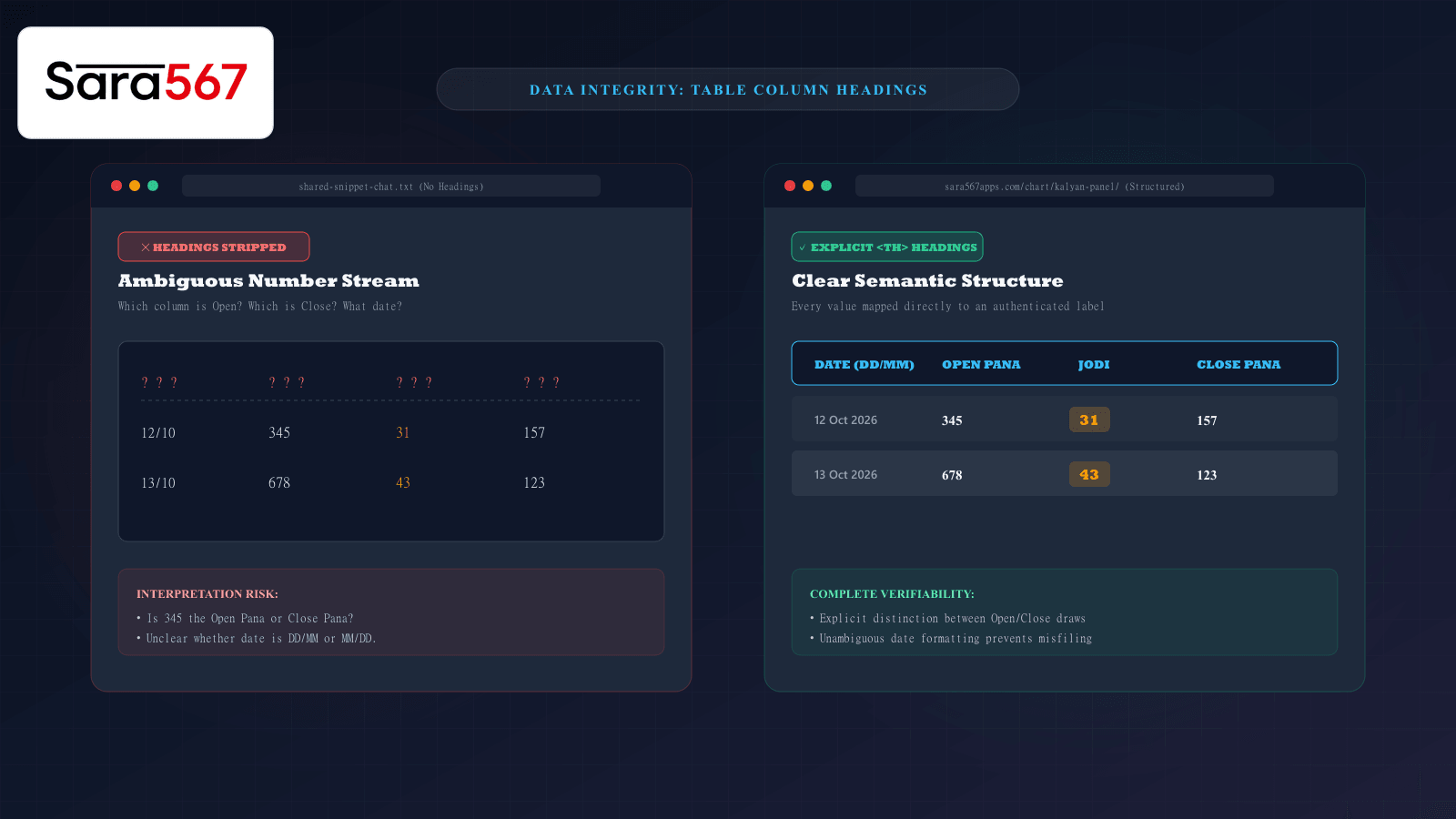
In data management and digital communications, numbers rarely speak for themselves. While a mathematical digit like 43 has an absolute quantitative value, its practical meaning depends entirely on the label assigned to it. Is 43 a temperature in Celsius, a percentage, a minute timestamp, or a two-digit market Jodi?
On informational platforms like Sara 567, thousands of historical entries for markets such as Kalyan, Madhur Morning, and Milan Day are organized into multi-column matrices. When users copy a row from these tables or paste an excerpt into chat groups without the accompanying column headings, severe misinterpretations inevitably follow.
Understanding why table headers serve as the cognitive backbone of data sharing ensures that records remain intelligible, verifiable, and free of confusion across all digital channels.
The Illusion of Simplicity: What Happens When Headings Disappear
Consider a typical message pasted into an online discussion forum:
12/10   345   31   157
13/10   678   43   123
To an experienced archivist who already knows the specific market format, these numbers might appear self-evident. But to anyone reviewing the record without prior context, the lack of column headings introduces immediate ambiguity:
- Which value is the opening draw, and which is the closing draw? If the order is reversed or formatted according to a non-standard regional convention, a reader might mistake
157for the opening Pana and345for the closing Pana. - What does the date represent? Does
12/10mean October 12th (the international DD/MM standard) or December 10th (the US MM/DD convention)? - What market does this belong to? Without a header designating whether this record represents Kalyan Day, Milan Night, or Time Bazar, the entire row is functionally orphaned.
┌────────────────────────────────────────────────────────────────────────┐
│                        DATA ANCHORING BREAKDOWN                        │
├────────────────────┬───────────────────────────────────────────────────┤
│ WITHOUT HEADERS    │ 12/10 │ 345 │ 31 │ 157                            │
│ (Raw Stream)       │ Ambiguous sequence: No structural role assigned   │
├────────────────────┼───────────────────────────────────────────────────┤
│ WITH HEADERS       │ DATE       │ OPEN PANA │ JODI BRACKET │ CLOSE PANA│
│ (Semantic Context) │ 12/10/2026 │ 345       │ 31           │ 157       │
└────────────────────┴────────────┴───────────┴──────────────┴───────────┘
By retaining the header row, every isolated cell is bound to a verified category, eliminating guesswork.
The Technical Role of <th scope="col"> in HTML Tables
In web architecture, column headings are not merely visual decorations rendered in bold text. They provide essential programmatic metadata defined by the W3C HTML standard through the <th> element.
When a browser renders a properly structured table, it uses semantic markup:
<table>
  <thead>
    <tr>
      <th scope="col">Date</th>
      <th scope="col">Open Pana</th>
      <th scope="col">Jodi</th>
      <th scope="col">Close Pana</th>
    </tr>
  </thead>
  <tbody>
    <tr>
      <td>12 Oct 2026</td>
      <td>345</td>
      <td>31</td>
      <td>157</td>
    </tr>
  </tbody>
</table>
This semantic structure performs several invisible technical functions:
1. Screen Reader Accessibility
For visually impaired individuals utilizing assistive screen readers (such as NVDA or VoiceOver), the software does not simply read text from left to right. When moving from cell to cell within the grid, the screen reader automatically announces the associated column header before speaking the cell's contents: "Open Pana, 345... Jodi, 31... Close Pana, 157". If headers are stripped or coded as plain <td> elements, the screen reader announces a dizzying list of disconnected numbers.
2. Mobile Responsive Scrolling
On mobile devices with narrow viewports, wide market tables often employ frozen or sticky headers. As a user scrolls down hundreds of historical rows spanning months or years, the sticky header remains pinned to the top of the screen. Without persistent column headers, a user scrolling past row thirty loses track of which column corresponds to which session draw.
3. Data Parsing and Automated Indexing
Search engines and automated archiving crawlers rely on <th> tags to map table relationships for structured rich snippets. When Google indexes a data table, column headers allow the search engine to understand table entities and present relevant excerpts directly in search results.
Three Common Traps When Copying and Pasting Tables
When readers copy content from a website to paste into a spreadsheet, email, or instant message, several formatting errors frequently strip column headers:
1. Partial Row Selection
Users often click and drag their cursor across only the recent three or four rows of interest, skipping the very top row containing the column titles. While this saves copying time, anyone receiving the resulting text receives an unanchored matrix of numbers.
2. Clipboard Delimiter Collapses
When copying from a website into plaintext chat platforms (like WhatsApp or Telegram), tab delimiters that separate columns in HTML often collapse into variable single spaces. Without column headers to define the intended width and boundaries, the second and third columns drift into misaligned clusters.
3. Cropping During Screenshot Sharing
When capturing a phone screen to share a result, people frequently pinch or crop the capture tightly around the bottom rows to zoom in on the numbers. This unintentionally clips off the header banner, removing the market title and column designations.
Best Practices for Sharing Structured Number Tables
To ensure shared records retain 100% of their informational value, follow these standard practices:
┌────────────────────────────────────────────────────────────────────────┐
│               RECOMMENDED PRACTICES FOR SHARING DATA                   │
├────────────────────────────────────────────────────────────────────────┤
│ 1. ALWAYS INCLUDE THE HEADER ROW: Never copy or screenshot a table row │
│    without including the top row that defines the column categories.   │
│                                                                        │
│ 2. SPECIFY THE SOURCE MARKET AND DATE: State the exact market identity │
│    (e.g., "Kalyan Day") and the full calendar year (e.g., "2026").     │
│                                                                        │
│ 3. USE MONOSPACED CODE FORMATTING IN TEXT: In chat applications, wrap   │
│    pasted tables in triple backticks (```) to enforce monospace        │
│    character alignment across all mobile screens.                      │
│                                                                        │
│ 4. LINK TO THE PRIMARY CANONICAL SOURCE: Accompany any pasted excerpt  │
│    with the live link (e.g., to the verified Sara 567 directory) so    │
│    recipients can independently audit the full original table.        │
└────────────────────────────────────────────────────────────────────────┘
Summary
In any historical number repository, context is the difference between verifiable information and random digits. Column headings provide the coordinates that turn raw numbers into actionable records. Whether you are archiving records, sharing screenshots, or developing web tables, preserving explicit column headings guarantees that your data remains accurate, accessible, and universally understood.
Explore Corresponding Market Charts & Verification Tools
Verify real-time numbers, track open/close records, and analyze weekly trends on our informational dashboard.