
Why Google Search Results Sometimes Show an Old Page Title
Why Google Search Results Sometimes Show an Old Page Title
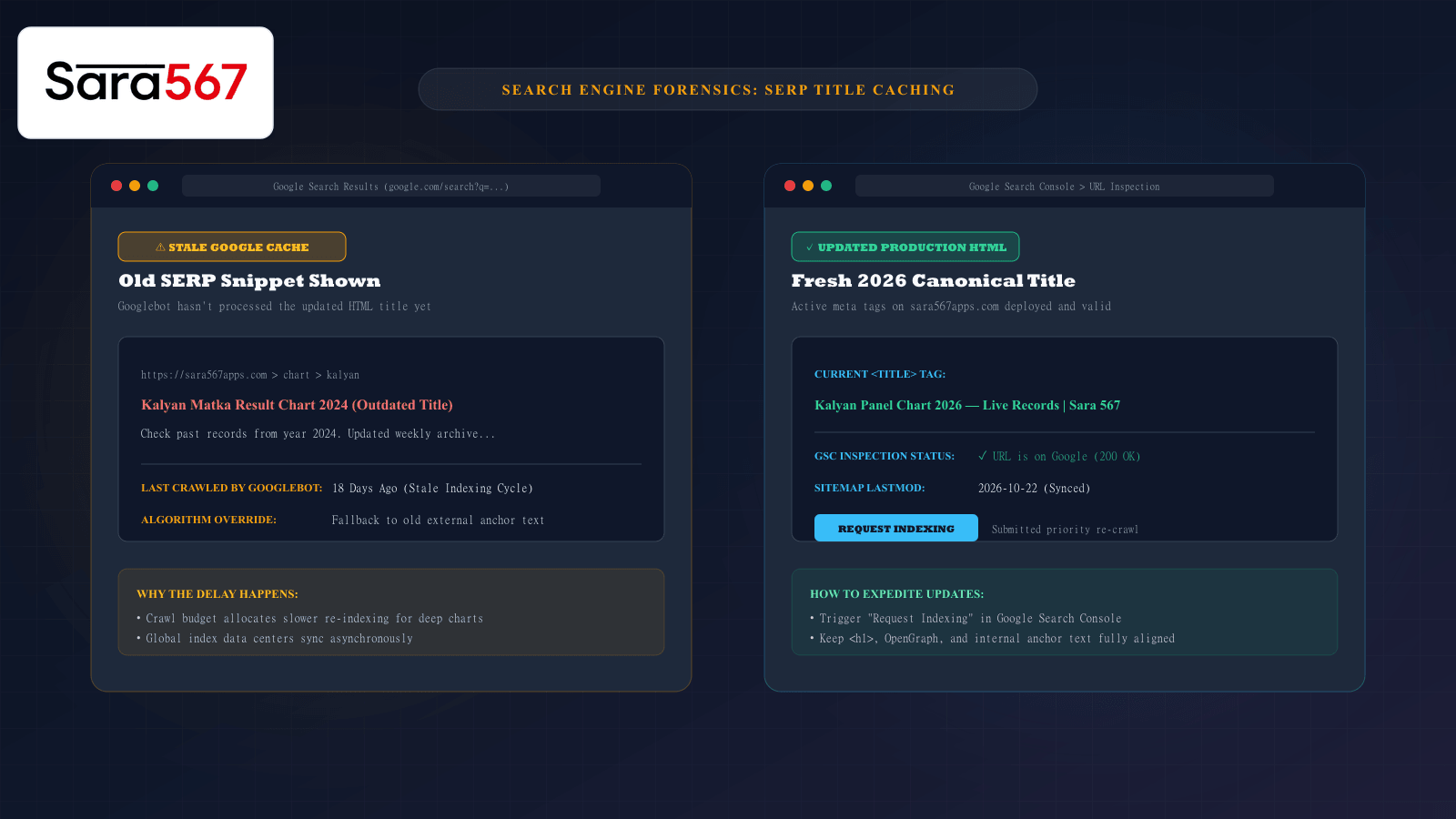
A frequent source of confusion for website operators and everyday internet users occurs when a webpage’s title is updated, but Google Search continues displaying the old version in search results days or even weeks later.
For instance, when an informational platform like Sara 567 updates its Kalyan Panel Chart page heading and metadata to reflect the new 2026 calendar year, searchers may still see "Kalyan Chart 2024" or "Kalyan Chart 2025" on Google's Search Engine Results Pages (SERPs). Clicking the search result opens the live page, which correctly displays the current 2026 header.
Why does this discrepancy exist? Is Google ignoring the website's HTML, or is something else happening behind the scenes?
Understanding the technical mechanisms of Googlebot’s crawling lifecycle, global indexing caches, and algorithmic title rewriting clarifies why search snippets lag behind live web pages and how webmasters accelerate index synchronization.
The Separation of Live Web vs. Google’s Cached Index
The first critical technical concept to grasp is that Google Search does not query live websites in real time.
When you type a query into Google, you are not searching the live internet; you are searching Google's stored index of the internet—a massive distributed database known as the Caffeine Index:
┌────────────────────────────────────────────────────────────────────────┐
│                   THE THREE-STAGE SEARCH PIPELINE                      │
├────────────────────┬───────────────────────────────────────────────────┤
│ 1. CRAWLING        │ Googlebot requests the HTML file from the origin  │
│    (Discovery)     │ server and queues it for processing.              │
├────────────────────┼───────────────────────────────────────────────────┤
│ 2. RENDERING &     │ Google's rendering engine executes scripts, parses│
│    INDEXING        │ text, and stores the page in the global database. │
├────────────────────┼───────────────────────────────────────────────────┤
│ 3. SERP SERVING    │ When a user searches, Google formats a snippet    │
│    (Query Time)    │ based on the stored snapshot and query relevance. │
└────────────────────┴───────────────────────────────────────────────────┘
A change made to your website’s <title> tag on Monday only appears in Google Search after Googlebot revisits the URL, re-renders the DOM, and pushes the updated record across its global network of data centers.
Four Reasons Google Displays an Outdated Page Title
1. Crawl Frequency & Crawl Budget Allocation
Googlebot does not crawl every page on the web at the same frequency. Crawl schedules are governed by algorithmic priority:
- High-authority homepages and breaking news feeds are re-crawled every few minutes or hours.
- Deep informational tables, subcategory archives, and paginated historical logs are re-crawled much less frequently—often on cycles ranging from 5 to 21 days.
If an archivist updates a page title on October 5th, but Googlebot’s scheduled crawl cycle does not visit that specific URL until October 22nd, Google will continue serving the old title saved during its previous crawl.
2. Global Data Center Indexing Latency
Google operates dozens of massive data centers worldwide. When Googlebot indexes an updated page, the updated record is not synchronized instantly across all global clusters.
Depending on your geographic location and the specific Google data center serving your query, you might see the updated title while a user in another region still sees the previous cache snapshot for another 24 to 48 hours.
3. Google's Algorithmic Title Rewriting System
In August 2021, Google introduced a fundamental change to how it generates search titles. Google announced that it would no longer rely solely on the HTML <title> tag provided by webmasters.
Instead, Google's machine learning systems analyze the entire page and frequently rewrite the SERP title based on:
- The main
<h1>heading on the page. - Visual prominence (subheadings or hero banners that stand out visually).
- Anchor text used by other external websites linking to that page.
- OpenGraph metadata (
<meta property="og:title">).
If an HTML <title> tag is updated to "Kalyan Panel Chart 2026", but the page’s internal <h1> tag still reads "Kalyan Panel Chart Archive", or external backlinks still refer to the old title, Google may algorithmically choose to display the older, familiar title because it believes it better matches what users are searching for.
4. Stale HTTP Caching Directives
If an origin web server returns aggressive Cache-Control headers (e.g., Cache-Control: public, max-age=2592000), proxy caches and automated crawlers are explicitly instructed that the resource will remain unchanged for 30 days. Misconfigured caching headers can inadvertently discourage Googlebot from fetching fresh HTML.
How Webmasters Expedite Google Title Updates
For website administrators and content managers, waiting weeks for automated re-crawling is often unacceptable. Fortunately, there are several direct methods to signal Google that a page has changed:
┌────────────────────────────────────────────────────────────────────────┐
│                   EXPEDITED INDEXING ACTION PLAN                       │
├────────────────────────────────────────────────────────────────────────┤
│ 1. REQUEST RE-INDEXING IN GOOGLE SEARCH CONSOLE (GSC):                 │
│    Paste the modified URL into the GSC URL Inspection bar.             │
│    Click "Test Live URL" to ensure Google can parse the new HTML.      │
│    Click "Request Indexing" to place the URL in the priority queue.    │
│                                                                        │
│ 2. UPDATE SITEMAP <LASTMOD> TIMESTAMPS:                                │
│    Whenever an SSG build occurs on sara567apps.com, update the         │
│    <lastmod> tag in sitemap.xml to the current date. Googlebot uses    │
│    sitemap timestamps to schedule intelligent crawl passes.            │
│                                                                        │
│ 3. MAINTAIN CONSISTENCY ACROSS ALL TITLE SIGNALS:                      │
│    Ensure your <title>, <h1>, <meta property="og:title">, and internal │
│    breadcrumb links all reflect the exact same title wording.          │
│                                                                        │
│ 4. CLEAR CDN EDGE CACHES:                                              │
│    Purge cached HTML on Cloudflare or edge CDNs so Googlebot is        │
│    guaranteed to receive the new server-side rendered payload.         │
└────────────────────────────────────────────────────────────────────────┘
Summary
Seeing an outdated title in Google Search does not mean a website is broken or unmaintained. It simply reflects the natural latency of search engine indexing cycles and algorithmic title formulation. By understanding how Googlebot processes web pages and utilizing Google Search Console to request priority re-crawls, platforms like Sara 567 ensure that search snippets accurately reflect the freshest live records.
Explore Corresponding Market Charts & Verification Tools
Verify real-time numbers, track open/close records, and analyze weekly trends on our informational dashboard.