
Why Web Archives Can Show an Incomplete Version of a Page
Why Web Archives Can Show an Incomplete Version of a Page
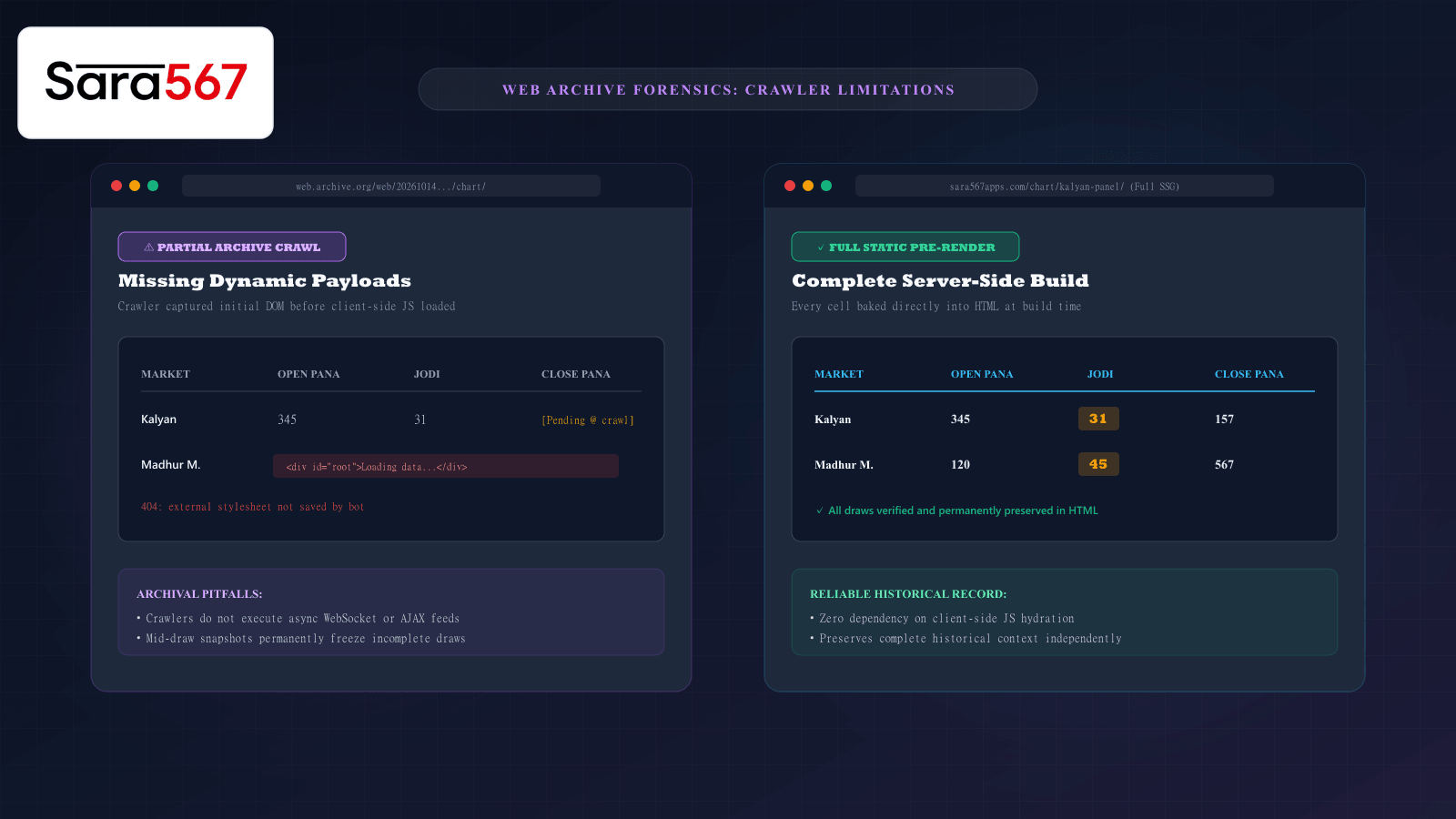
When researchers, market followers, or archivists want to verify what information was displayed on a website months or years ago, public preservation services like the Internet Archive’s Wayback Machine or archive.today are the default reference points. By entering a URL, users can view past calendar snapshots and inspect historical layouts.
However, viewing a preserved webpage in a web archive is fundamentally different from opening a live site in your browser. Often, visitors inspecting archived records for markets like Kalyan, Madhur Morning, or Milan Day encounter strange anomalies: empty table grids, broken layout formatting, "Loading..." spinners that never resolve, or rows where only the opening number appears.
Understanding the technical limitations of web archiving crawlers explains why these gaps exist and how to cross-reference historical data accurately on Sara 567.
How Web Archiving Crawlers Operate
To understand why archives contain partial data, it helps to understand how web archiving robots (such as the Heritrix crawler used by the Internet Archive) gather pages.
When a crawler visits a webpage:
- It sends a standard
GETrequest to the server and downloads the raw HTML file. - It scans that initial HTML for links, stylesheets (
<link rel="stylesheet">), and static image assets (<img>). - It packages those raw files into standardized Web ARChive (WARC) files for long-term preservation.
Crawler Robot ─── [GET /chart/kalyan-panel/] ───► Web Server
Crawler Robot ◄── [Initial Static HTML Only] ──── Web Server
                  (No JS execution / No live WebSockets)
While this process works smoothly for static text articles, modern interactive web applications rely heavily on dynamic technologies that automated crawlers frequently fail to capture.
Four Reasons an Archived Chart Page Appears Incomplete
1. Client-Side JavaScript Hydration & AJAX Calls
Many contemporary web applications are built as Single Page Applications (SPAs) using frameworks like React, Vue, or Angular. When a user visits the live site, their browser downloads a lightweight HTML shell and executes JavaScript, which then sends asynchronous fetch() or XMLHttpRequest requests to a database API to pull in the table numbers.
Standard archive crawlers often do not execute client-side JavaScript, or their headless browser engines time out before dynamic API calls resolve. As a result, the crawler captures and permanently saves only the empty container:
<!-- What the crawler saved in 2024 -->
<div id="chart-root">
  <div class="spinner">Loading historical records...</div>
</div>
When you view that snapshot today, the embedded script tries to query an old backend API endpoint that no longer exists or is blocked by CORS security, leaving the table permanently blank.
2. CDN Assets and Subdomain 404s
To deliver fast loading times, websites frequently host their CSS stylesheets, font files, and icons on external Content Delivery Networks (CDNs), such as cdn.example.com or third-party cloud buckets.
Archive crawlers often operate under strict scope rules that prohibit crawling cross-domain assets to conserve bandwidth and prevent crawling loops. If the crawler archives the HTML but ignores the external stylesheet, the archived page displays as unstyled plaintext, with table borders collapsed and numbers scattered across the screen.
3. Mid-Draw Snapshot Timing
Market operations follow strict sequential timelines. For instance, in Kalyan Day, the opening draw might be declared in the afternoon (e.g., 345 - 3), while the closing draw (1 - 157) concludes in the evening.
If an archive bot crawls the webpage at 16:30—precisely halfway between the opening and closing sessions—it permanently freezes that mid-draw state into the archive:
┌────────────────────────────────────────────────────────────────────────┐
│               MID-DRAW CRAWLER ARTIFACT (WAYBACK MACHINE)              │
├──────────────┬──────────────┬──────────────┬──────────────┬────────────┤
│ DATE         │ OPEN PANA    │ JODI BRACKET │ CLOSE PANA   │ STATUS     │
├──────────────┼──────────────┼──────────────┼──────────────┼────────────┤
│ 14 Oct 2026  │ 345          │ 3*           │ [PENDING]    │ In Progress│
└──────────────┴──────────────┴──────────────┴──────────────┴────────────┘
A researcher viewing this snapshot three years later might incorrectly assume the market never concluded on that date, unaware that the final close was declared just two hours after the crawler departed.
4. Edge Firewalls and Bot Challenges
Modern web portals protect their servers against aggressive automated traffic using edge firewalls like Cloudflare or AWS WAF. When an archiving crawler initiates a high-frequency crawl, the firewall may trigger a CAPTCHA challenge or an HTTP 403 Forbidden block. When this happens, the web archive saves the firewall challenge page instead of the actual data table.
How Static Site Generation (SSG) Solves Archival Reliability
To prevent these digital preservation issues, modern informational platforms like Sara 567 utilize Static Site Generation (SSG) via Vite and pre-rendering pipelines.
Unlike dynamic client-rendered platforms that require user-side JavaScript execution:
- Every table row, column heading, and historical entry is compiled directly into static HTML markup on the web server before deployment.
- No client-side database queries or external API handshakes are required to see the numbers.
- When an archive crawler visits an SSG page, the complete data set is contained entirely within the initial HTML payload, ensuring that future archival snapshots remain 100% complete and legible forever.
Checklist: How to Verify Archived Historical Records
When using web archives to verify past information, follow this evaluation protocol:
┌────────────────────────────────────────────────────────────────────────┐
│             ARCHIVE SNAPSHOT VERIFICATION PROTOCOL                     │
├────────────────────────────────────────────────────────────────────────┤
│ 1. CHECK THE CAPTURE TIMESTAMP: Note the exact time of day the capture │
│    occurred. Was it before, during, or after market declaration times? │
│                                                                        │
│ 2. INSPECT FOR ASSET WARNINGS: Look at the top banner of the archive   │
│    viewer. Does it report missing CSS, JS, or 404 asset errors?        │
│                                                                        │
│ 3. AUDIT MULTIPLE SNAPSHOT DATES: Never rely on a single calendar dot. │
│    Compare consecutive snapshots taken days or weeks later.            │
│                                                                        │
│ 4. CROSS-REFERENCE AGAINST CANONICAL STATIC ARCHIVES: Check verified   │
│    pre-rendered historical tables on sara567apps.com/chart/ to confirm │
│    whether any missing numbers were simply unrendered crawler blanks.  │
└────────────────────────────────────────────────────────────────────────┘
Summary
Web archives are indispensable digital preservation tools, but they are subject to real-world technical constraints. Missing client-side JavaScript hydration, cross-domain CDN exclusions, and unfortunate crawl timing can create the false impression that records were lost or incomplete. By understanding how crawlers interact with web architectures, researchers can objectively interpret historical snapshots and rely on authoritative static archives for authentic data verification.
Explore Corresponding Market Charts & Verification Tools
Verify real-time numbers, track open/close records, and analyze weekly trends on our informational dashboard.