
How to Check Whether a Screenshot Has Been Cropped or Taken Out of Context
How to Check Whether a Screenshot Has Been Cropped or Taken Out of Context
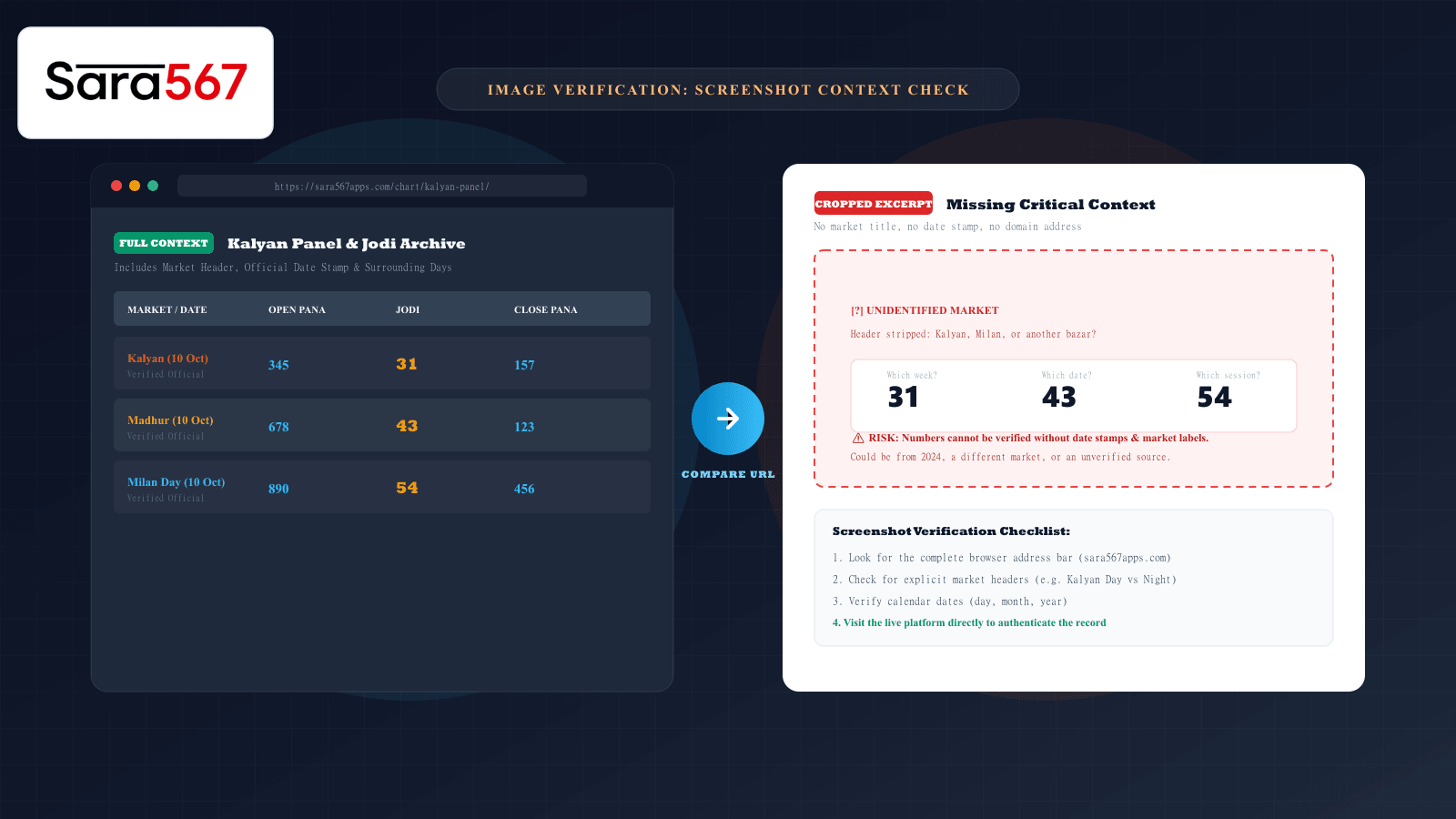
In digital communication groups, messaging channels, and social media forums, screenshots are the most common currency for sharing market numbers. A user shares a tight image crop showing a winning Jodi like 31 or a clean three-digit Pana like 345, presenting it as proof of today’s Kalyan or Madhur Morning result.
However, a screenshot is fundamentally a static raster graphic. Unlike an active webpage, an image file cannot be queried, inspected, or refreshed. Without surrounding table context, a cropped screenshot can easily mislead readers—not necessarily through malicious digital alteration, but simply by omitting the surrounding metadata required to interpret what the numbers actually represent.
Learning how to inspect a shared screenshot systematically allows you to determine whether it reflects an authentic, current record or an outdated, out-of-context snippet.
The Anatomy of Context: What Cropping Removes
When someone takes a full-page capture of an informational portal like Sara 567, the image carries multiple corroborating anchor points:
┌────────────────────────────────────────────────────────────────────────┐
│ BROWSER ADDRESS BAR: https://sara567apps.com/chart/kalyan-panel/        │
├────────────────────────────────────────────────────────────────────────┤
│ TABLE HEADER: Kalyan Day — Historical Panel Archive                    │
│ DATE STAMP: Calendar Week 41 (Monday, 05 Oct 2026 to Sunday, 11 Oct)   │
├──────────────┬──────────────┬──────────────┬──────────────┬────────────┤
│ Day / Date   │ Open Pana    │ Jodi Bracket │ Close Pana   │ Status     │
├──────────────┼──────────────┼──────────────┼──────────────┼────────────┤
│ Mon (05 Oct) │ 345          │ 31           │ 157          │ Declared   │
│ Tue (06 Oct) │ 678          │ 43           │ 123          │ Declared   │
└──────────────┴──────────────┴──────────────┴──────────────┴────────────┘
When a screenshot is tightly cropped to display only the inner numbers (31 and 43), critical verification anchors vanish:
- The Market Identity: Is this Kalyan, Milan Day, Madhur Night, or a regional bazar?
- The Temporal Context: Was this recorded today, last month, or three years ago?
- The Session Type: Does this represent the opening draw, the closing draw, or a weekly aggregate?
- The Source Authority: Did the numbers originate on an established platform or an unverified social media graphic?
Four Signs a Screenshot Lacks Verification Context
When evaluating any shared result image, look for these four common warning signs:
1. Missing Browser Address Bar or Domain URL
An authentic webpage capture typically retains the browser’s navigation bar or a visible domain watermark indicating the source host. If an image cuts off right above the table row, there is no technical trace connecting the image to a verifiable domain.
2. Ambiguous or Omitted Date Stamps
A screenshot showing only day names ("Mon", "Tue") without an explicit calendar date ("05 Oct 2026") is impossible to authenticate. Multi-year archives reuse identical weekly column formats; an un-dated crop could represent any Monday in the past decade.
3. Asymmetrical Cropping Along Table Borders
Notice where the image boundaries fall. If the top header ("Market Name") and the left column ("Date") are cropped out while only the center cells remain visible, the crop was intentionally or accidentally stripped of its defining coordinates.
4. Compression Inconsistencies and Font Variations
When an image is repeatedly forwarded through messaging apps like WhatsApp or Telegram, JPEG re-compression introduces visual artifacts (muddy haloing around text). If one number in a table appears sharper, larger, or differently antialiased than its neighboring cells, the image may have been stitched together from multiple sources.
Important Caution: Visible compression artifacts or unusual framing do not automatically prove intentional deception or forgery. Many legitimate users simply crop images on their smartphones to highlight a specific number for clarity. The issue is not malice; the issue is that cropped images cannot be verified on their own.
Step-by-Step: How to Verify a Screenshot Against Live Records
Never rely on an isolated screenshot to verify historical records. Instead, use this three-step cross-referencing process:
[Received Screenshot] ──> Identify Claimed Market & Digits
                                  │
                                  ▼
[Open Official Site]   ──> Navigate to Sara 567 Live Market Charts
                                  │
                                  ▼
[Cross-Reference]      ──> Match Date, Day, Open Pana, Jodi & Close Pana
Step 1: Note the Explicit Numbers
Write down the exact sequence shown:
- Example: Open Pana
345, Jodi31, Close Pana157.
Step 2: Access the Primary Source Directly
Rather than clicking an unverified link included in a chat message, open your browser and navigate directly to the official platform:
- Go to the All Market Charts Directory.
- Select the designated market hub (e.g., Kalyan Panel Chart).
Step 3: Compare Neighboring Grid Coordinates
Locate the claimed date row. Look at the surrounding cells:
- Does the preceding day (Monday) match?
- Does the succeeding day (Wednesday) match?
- Does the mathematical sum of the Pana digits match the Jodi single digit? (For
345, 3 + 4 + 5 = 12 → single digit2. If the screenshot claims31, verify whether an unverified typo or crop misaligned the column).
If the live, indexed archive matches all surrounding data points, the record is authenticated. If the live database shows different values or indicates that session was closed, the screenshot represents an outdated or mislabeled capture.
Verification Checklist for Shared Media
| Checklist Item | Complete Capture | Cropped Excerpt | Action Required |
|---|---|---|---|
| Visible Domain URL | Visible in address bar | Stripped | Inspect platform directly. |
| Calendar Date | Full DD/MM/YYYY | Day name only | Locate week row in live chart. |
| Market Header | Prominently displayed | Omitted | Do not assume market identity. |
| Neighboring Rows | Full week visible | Single isolated row | Cross-reference adjacent dates. |
| Pana & Jodi Coherence | Both Open/Close shown | Isolated digit | Verify arithmetic consistency. |
Summary: Ground Your Analysis in Primary Sources
A screenshot is a convenient sharing format, but it should always be treated as a pointer, not primary evidence.
Whenever you receive a cropped chart image:
- Do not accept isolated numbers without date and market anchors.
- Cross-reference the digits against the live all market charts index.
- Understand how layout changes occur across devices by reading our guides on how charts look different in print than on screen and interpreting blank, zero, and pending table cells.
Explore Corresponding Market Charts & Verification Tools
Verify real-time numbers, track open/close records, and analyze weekly trends on our informational dashboard.